How to Actually Use Google Search Console Data
Find "Striking Distance" keywords, understand what Google already thinks about your site, and turn Search Console data into a repeatable growth workflow.
TL;DR — The Key Insight
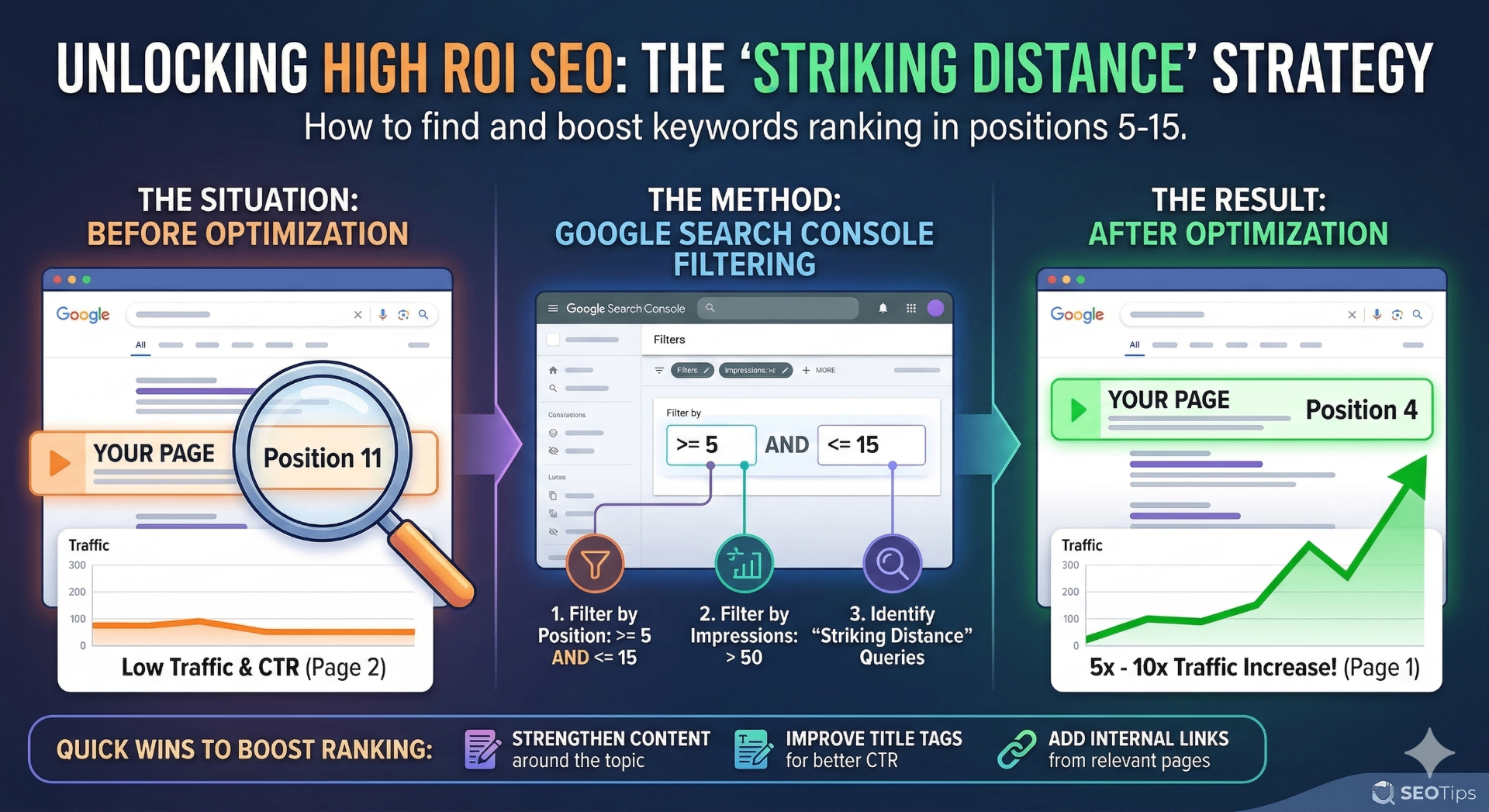
Search Console shows queries where Google already tested your page. The highest-ROI SEO work is improving pages that rank between positions 5–15 ("striking distance"). Moving from position 11 → position 4 can increase traffic 5x–10x without creating new content.
This guide shows you exactly how to find these opportunities and push them over the threshold.
Most people install Google Search Console, glance at a few charts, and never use it to drive real growth.
That's a mistake.
Search Console isn't just a monitoring tool — it's one of the most powerful datasets you have for understanding how search engines actually see your site.
If you know how to interpret the data, it will tell you:
- which pages are close to ranking
- which keywords Google already associates with your site
- where you're missing easy traffic
- and what improvements will produce the highest ROI
The Mental Model: Search Console Shows Search Potential
Think of Search Console as a window into Google's partial belief about your site.
Google doesn't instantly decide your ranking. Instead it gradually builds confidence based on signals like:
Search Console exposes the intermediate state of that evaluation.
Which means it often shows queries where Google thinks:
"This page might be relevant… but we're not quite sure yet."
Those are the opportunities.
The Four Core Metrics in Search Console
Every query record in Search Console has four key fields. Understanding these together is where the real value comes from.
query— The search termclicks— Traffic that happenedimpressions— Times shown in resultsctr— Click-through rateposition— Average rankingImpressions: The Most Underrated Metric
Impressions mean your page appeared somewhere in search results for that query — even if the position was low.
This is extremely important.
If you have impressions, Google has already decided:
Your page is relevant enough to show.
That means Google is already testing your page against that query. Which means you're closer to ranking than you think.
Position: Where You Sit in the Ranking Funnel
Position is the average ranking position across impressions. It's the most useful metric for identifying SEO opportunity zones.
Position 9.5→ Bottom of page 1Position 12→ Page 2Position 35→ Page 4Clicks: Traffic That Actually Happened
Clicks measure actual traffic from search results. But clicks alone can be misleading.
Example
Impressions: 2,000
Clicks: 3
That doesn't mean the keyword is useless. It often means the page is ranking just outside the click zone.
CTR (Click Through Rate)
CTR = clicks / impressions. This metric helps diagnose SERP competitiveness and snippet quality.
Low CTR with good rankings usually means:
- Weak title tag
- Poor meta description
- Irrelevant snippet
- SERP features stealing clicks
The "Striking Distance" Concept
The most valuable queries in Search Console are the ones in striking distance.
Striking Distance Queries
Keywords where your site ranks roughly Position 5 – 15.
That range represents the bottom of page 1 and top of page 2 — one of the most valuable zones in SEO.
Why Positions 5–15 Matter
Traffic drops dramatically after the top few results. Typical click curves look like this:
| Position | Avg. CTR | Visual |
|---|---|---|
| #1 | ~30% | |
| #2 | ~15% | |
| #3 | ~10% | |
| #4 | ~7% | |
| #5 | ~5% | |
| #10 | ~2% | |
| #15 | <1% |
That means moving a page from:
Position 11 → Position 4 = 5x–10x traffic
Without creating new content. This is why striking distance optimization is often the highest ROI SEO work you can do.
How to Find Striking Distance Queries
Using Search Console data, filter queries with something like:
position >= 5
position <= 15
impressions > 50
This removes low-signal queries and surfaces real opportunities.
| Query | Position | Impressions |
|---|---|---|
| prerender io alternatives | 9.5 | 320 |
| bolt indexing speed | 8.3 | 246 |
| dynamic rendering alternatives | 11 | 180 |
These are perfect candidates for optimization.
Are search engines even seeing your content?
Before optimizing for striking distance, make sure bots can actually render your pages.
Find out in under 1 minute:
Test your visibility on social and AI platforms(No signup required)
How to Push a Page from Position 10 → Position 3
Once you identify a striking distance query, you focus on improving the page that already ranks for it. There are several proven ways to do this.
Strengthen Topic Relevance
Google needs to clearly understand that your page answers the query. Improve headings, semantic coverage, examples, FAQs, and internal references.
For example if the query is prerender alternatives, add sections like:
- When to use prerendering
- Dynamic rendering alternatives
- SEO implications of prerendering
- Modern SSR vs prerender solutions
Improve Title Tags and CTR
If your page ranks but has poor CTR, improving the title tag alone can significantly increase traffic.
❌ Bad title
Rendering Solutions
✅ Better title
Prerender.io Alternatives (2026 Guide for JavaScript SEO)
Better titles increase clicks without changing ranking.
Add Internal Links
Internal links are one of the fastest ranking signals you can control.
If a page is in striking distance, add links from related guides, blog posts, comparison pages, and documentation. Use descriptive anchor text.
Example anchor text
See our full guide to prerender.io alternatives
Improve Content Depth
If competing pages are longer or more comprehensive, expand the article. Add:
- Technical explanations
- Diagrams
- Implementation examples
- Comparisons
- FAQs
Google rewards pages that fully satisfy search intent.
Update Freshness Signals
Updating content can help Google reevaluate a page. Small updates like:
- Updated examples
- Revised screenshots
- Refreshed statistics
…can improve ranking confidence.
Turning Search Console Data into a Workflow
The most productive SEO teams use a simple loop:
Step 1
Find striking distance queries
Step 2
Improve the page ranking for them
Step 3
Add internal links
Step 4
Update content depth
Step 5
Monitor rankings in Search Console
This cycle repeatedly pushes pages from page 2 → page 1
Which is where the real traffic lives.
Why Search Console Is So Powerful
Unlike keyword tools, Search Console shows queries where Google already tested your page.
That means:
✅ Google already thinks your page is relevant.
Your job is just to push it over the threshold.
✅ Far easier than ranking for a completely new keyword.
You're not starting from scratch — you're finishing what Google started.
The Key Insight
Search Console is not just a reporting tool. It's a map of where your next traffic gains are hiding.
And the striking distance queries are where the fastest wins live. If you focus on improving pages that already rank between positions 5–15, you can often generate major traffic gains with surprisingly small changes.
Final Thought
SEO often feels unpredictable. But Search Console gives you a rare advantage:
It shows exactly where Google already believes your content might deserve to rank higher.
Your job is simply to prove it. And the striking distance queries are where that proof pays off fastest.
Frequently Asked Questions
What are striking distance keywords in Google Search Console?
Striking distance keywords are queries where your site ranks between positions 5 and 15 — bottom of page 1 or top of page 2. These represent the highest-ROI optimization opportunities because small improvements can produce 5x–10x traffic gains.
How do I find striking distance queries in Search Console?
Filter your Search Console performance data for queries with average position between 5 and 15, and impressions greater than 50. This surfaces queries where Google already considers your page relevant but hasn't fully committed to ranking it highly.
Why do impressions matter more than clicks in Search Console?
Impressions mean Google already decided your page is relevant enough to show for that query. Even with low clicks, high impressions indicate Google is testing your page — meaning you're closer to ranking than you think.
How can I improve my position from page 2 to page 1?
Focus on five tactics: strengthen topic relevance with better headings and FAQs, improve title tags for CTR, add internal links from related pages, expand content depth to match competitors, and update freshness signals like examples and statistics.
Is Search Console better than third-party keyword tools?
For optimization, yes. Unlike keyword tools that estimate search volume, Search Console shows queries where Google has already tested your page. This means the relevance signal is confirmed — your job is just to push it over the ranking threshold.
Related Guides
SERP Tracking Guide
Monitor positions, understand fluctuations, and measure SEO success.
SEO Testing Guide
Tools, techniques, and best practices for continuous SEO improvement.
JavaScript SEO Guide
Best practices for client-side rendering, React, Vue, and Angular SEO.
Prerender.io Alternatives
Compare prerendering solutions for JavaScript SEO.
March Platform Update
Announcement of the Search Console dashboard integration.
SEO Foundation Checklist
Sitemap, robots.txt, Search Console & GTM setup guide for new sites.