Index Monitor: How DataJelly Tracks Google Indexing
Indexing is not one event. Google has to discover a URL, crawl it, understand it, choose whether it belongs in the index, and then decide when and where to serve it in results.
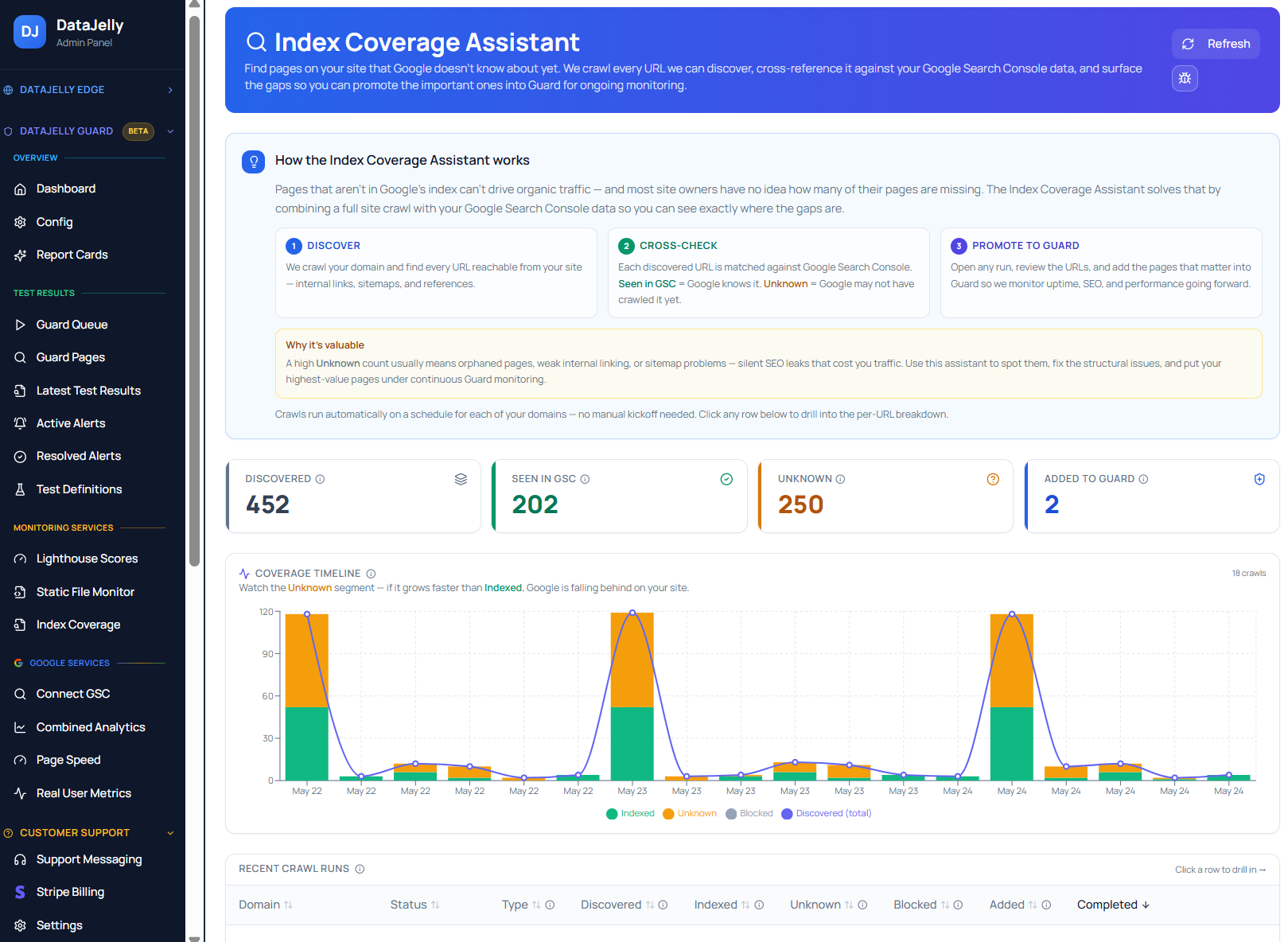
Index Monitor is built around that reality. It does not pretend every discovered page should be indexed. It helps you find the pages that matter, understand what Google currently knows, and add the right URLs to Guard so they are watched going forward.
How Google indexing works
Not every page makes it through every stage, and Google does not guarantee that a page will be crawled, indexed, or served just because it exists.
- Discovery: Google learns a URL exists through links, sitemaps, redirects, or previous crawls.
- Crawling: Googlebot requests the page and downloads the content it can access.
- Indexing: Google analyzes the page, canonical signals, robots rules, and rendered content.
- Serving: Google decides whether the indexed page is relevant to a search query.
That is why Index Monitor separates “we found this URL” from “Google has evidence for this URL.”
What DataJelly checks
Index Monitor combines multiple signals so you can tell what each one does and does not prove.
| Signal | What it tells you | What it does not prove |
|---|---|---|
| Site crawl discovery | The URL exists or was linked from the crawled site. | Google has crawled or indexed it. |
| Search Console performance | The URL has impressions or clicks in Google Search. | The page is technically healthy today. |
| URL Inspection | Google's indexed state, coverage state, canonical, and last crawl time when available. | That Google will rank the page for a specific query. |
| Guard membership | DataJelly is actively monitoring the page. | The page is indexed. |
| Search demand | The page or similar queries show demand. | The page deserves to be indexed without content quality. |
Understanding status labels
Indexed
DataJelly has a strong Google signal that the URL is visible or indexable through Search Console or URL Inspection data.
Action: Keep monitoring if the page matters. Review search demand and page quality next.
Unknown
DataJelly discovered the page, but Google data has not confirmed it yet. Often the highest-value group: live, important pages not yet in Search Console.
Action: Inspect the URL, verify canonical and robots signals, and add important pages to Guard.
Blocked, noindex, or canonicalized
Google may be intentionally excluded from indexing the page, or Google may have selected another canonical URL.
Action: Do not blindly request indexing. First decide whether the exclusion is correct.
Already in Guard
The URL is already monitored by Guard.
Action: Use Guard page health, alert history, Search Console data, and Lighthouse trends to understand ongoing quality.
What "Inspect Now" means
Inspect Now asks DataJelly to rerun Google's URL Inspection check for selected pages where Search Console access allows it. It is not the same as forcing Google to index a page — it checks Google's known status and returns the inspection fields DataJelly can read.
- A page was just discovered by the crawl.
- A page shows unknown indexing status.
- You fixed a canonical, robots, or noindex issue.
- You want the latest available Google inspection details before deciding whether to add the page to Guard.
What "last crawl" means
URL Inspection can include a last crawl time: the last time Google successfully crawled the URL with the primary crawler. If Google has never crawled it successfully, the field may be absent. Use it as context, not a guarantee.
| Signal | What it likely means |
|---|---|
| Recent crawl + not indexed | Google saw the page and chose not to index it. |
| No crawl date | Google has not successfully fetched the URL yet. |
| Old crawl date | Google has not refreshed the page since recent changes. |
How to use Index Monitor
1. Start with unknown pages
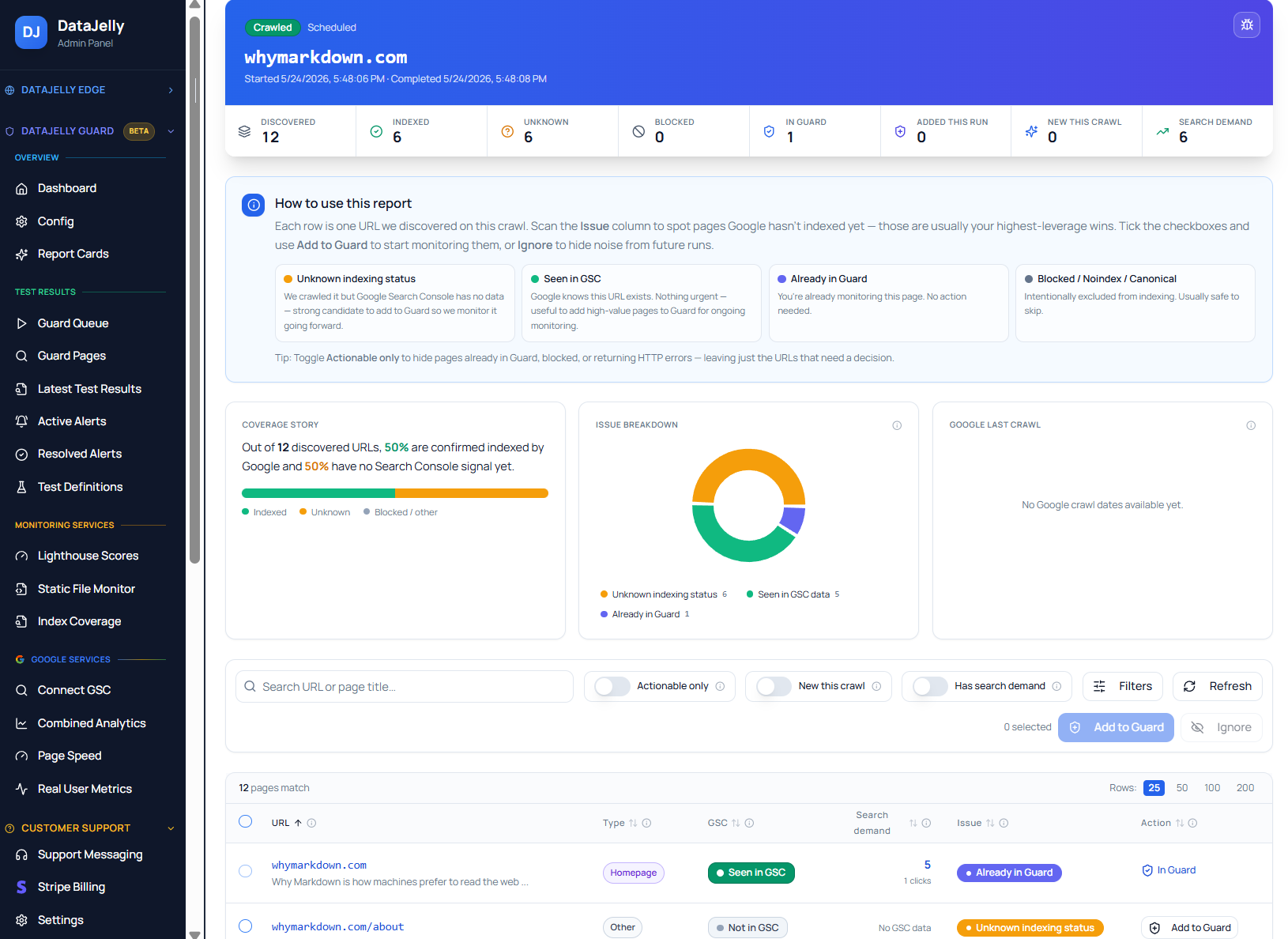
Unknown pages are the best place to look for missing opportunities. Ask whether the page is real, internally linked, in the sitemap, self-canonical, not blocked, and has enough unique content to deserve indexing.
2. Add important pages to Guard
If a page matters to revenue, signups, leads, support, docs, or brand visibility, add it to Guard so it monitors production output instead of leaving the page as a one-time crawl result.
3. Ignore noise
Skip search pages, parameter noise, duplicate routes, utility pages, temporary pages, canonicalized variants, and pages intentionally blocked from indexing.
4. Recheck after fixes
After changing metadata, canonical tags, robots rules, redirects, or page content, use Inspect Now to refresh the known inspection data where possible.
The DataJelly angle
Index Monitor is not just an SEO report. It is a triage system for deciding which pages deserve ongoing production monitoring.
The workflow is simple: find URLs, check what Google knows, decide what matters, add important pages to Guard, and monitor them continuously.
Turn discovery into monitoring
Find the pages Google has not confirmed yet, decide which ones matter, and add them to Guard so they are watched on every scan.
Frequently asked questions
Can DataJelly guarantee that Google indexes a page?
No. Google does not guarantee crawling, indexing, or serving for every page.
Why does DataJelly show a page as unknown?
The page was discovered by DataJelly, but Search Console or URL Inspection has not provided enough Google-side evidence yet.
Should I add every unknown page to Guard?
No. Add pages that matter. Ignore duplicate, low-value, blocked, or intentionally canonicalized URLs.
Is Inspect Now a request indexing button?
No. It refreshes inspection data. Requesting indexing is a separate Google workflow and should only be used after the page is actually ready.
Keep reading
Guard Test Catalog
The full searchable reference of every test, with severity and how-to-fix guidance.
Guard Test Suite
Every production check Guard runs once a page is monitored.
Google Search Console + Guard
Map clicks, impressions, and queries to page health.
Static File Monitoring
Discovery problems often start with broken sitemaps or robots rules.
How to Test What Google Sees
Verify crawler-visible output before requesting indexing.