The DataJelly Guard Test Suite: What We Monitor
Guard is built for a simple problem: a website can look fine to the person who opened the homepage while important production pages are broken for users, search crawlers, social previews, or AI systems.
The Guard test suite checks monitored pages for the failures that usually matter most: availability, rendering, content loss, SEO signal drift, performance regressions, crawler-facing metadata, and risky production changes. Add the pages you care about on KeyPages.ai and the suite runs against real production output.
Why production testing is different
A deploy can pass CI and still break production. These are not theoretical SEO issues — they are production quality problems.
- A route returns HTTP 200 but only serves an empty JavaScript shell.
- A React hydration issue hides the real content after load.
- The page title or H1 disappears.
- The canonical tag points somewhere else.
- A noindex tag ships by mistake.
- A third-party script causes resource errors.
- A page gets much slower after adding a widget.
- A sitemap or robots change blocks discovery.
How Guard thinks about a page
Guard treats a page as a layered system. A page can fail at one layer while passing another, which is what keeps the model practical.
- Transport: did the page respond successfully?
- Render: did the browser receive and render meaningful content?
- Content: did the important text, title, H1, and DOM structure stay intact?
- SEO signals: did indexability, canonical, structured data, social tags, and sitemap signals remain safe?
- Performance: did the page get slower or heavier in a meaningful way?
- Dependencies: did scripts, bundles, or third-party resources fail?
- Monitoring context: did this change matter enough to create an alert?
What Guard covers
The active suite spans six categories. Each one targets a different way a healthy-looking page can quietly fail.
Availability
The basic ways a production page can become unreachable or unsafe to crawl.
Examples: HTTP status failure, Unexpected 4xx response, Redirect loop, Redirect to homepage, TLS failure, Certificate expiry risk.
Why it matters: If users or crawlers cannot reliably fetch the page, everything else becomes secondary.
Render integrity
Cases where the browser output is missing, broken, or mostly unusable.
Examples: Blank page, Script-shell-only output, JavaScript crash, Critical bundle failure, High resource error rate.
Why it matters: JavaScript-heavy sites can return a successful HTTP response while showing crawlers or users a broken page.
Content integrity
Meaningful page-output changes that strip away what made a page useful.
Examples: Major DOM drop, Major text drop, Title removed, H1 removed, Critical selector missing.
Why it matters: A page may still load, but the content that made it useful can disappear.
SEO and crawler signals
The metadata and crawler instructions that influence discovery, indexing, and snippets.
Examples: Noindex added, Canonical changed, Open Graph removed, Structured data removed, Sitemap removed, Sitemap malformed, Mixed content.
Why it matters: These changes can quietly change how search engines and social or AI systems understand the page.
Performance regressions
Pages becoming slower or heavier in ways that hurt users and crawl efficiency.
Examples: Slow response, Severe slow load, TTFB spike, Large HTML size jump, Core Web Vitals regression.
Why it matters: Speed affects users, conversion, crawl efficiency, and the overall quality of the page experience.
Dependency and script risk
Risky resource behavior from scripts and bundles you do not fully control.
Examples: Third-party failure, Unexpected script, Critical bundle failure, High resource error rate.
Why it matters: Production sites depend on scripts they do not control. Guard surfaces when those dependencies create visible risk.
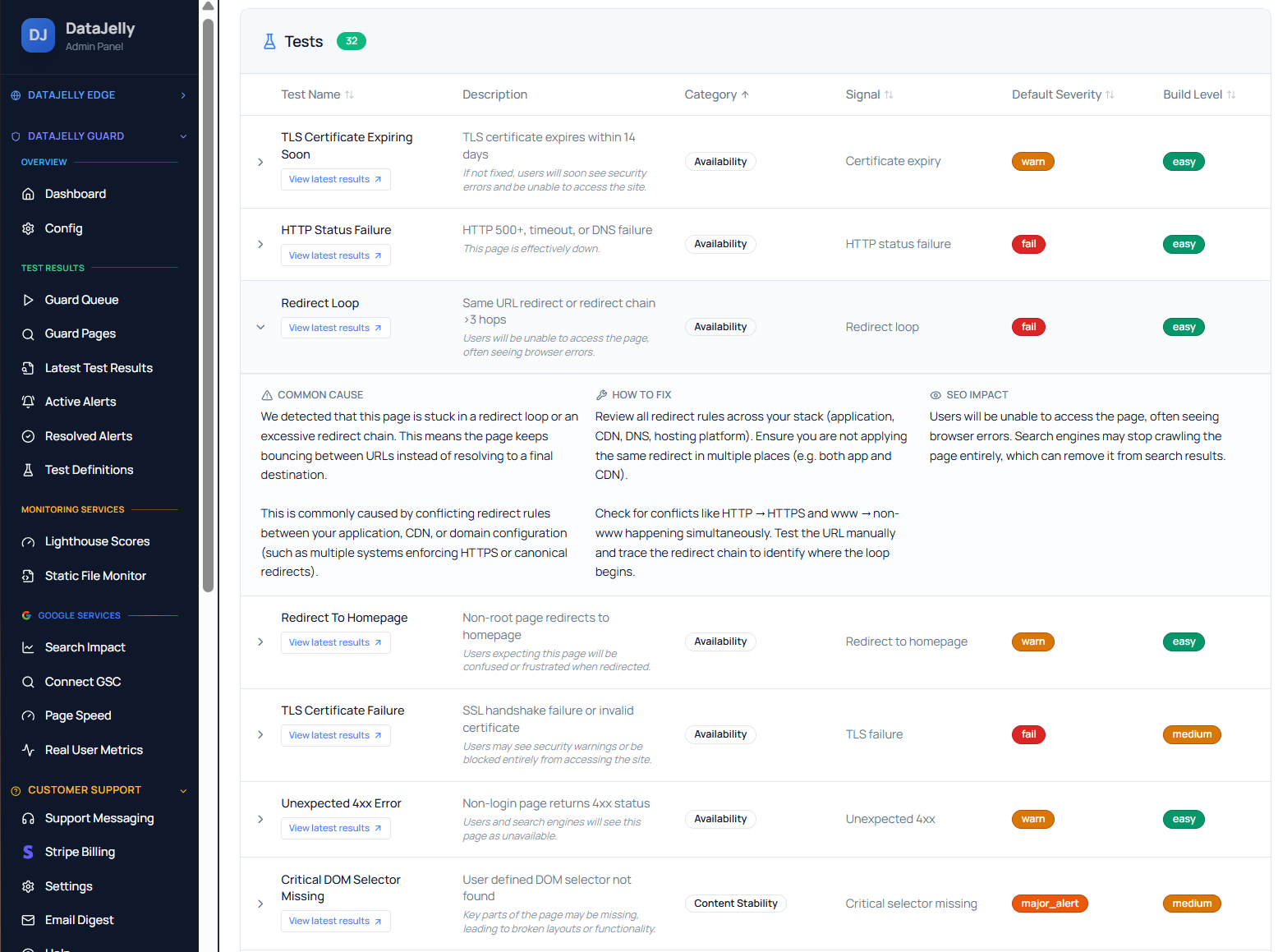
Want the full breakdown of every individual check? The Guard Test Catalog is a searchable reference of every test across these categories — what each one detects, its severity, and exactly how to fix it.
How to use test results
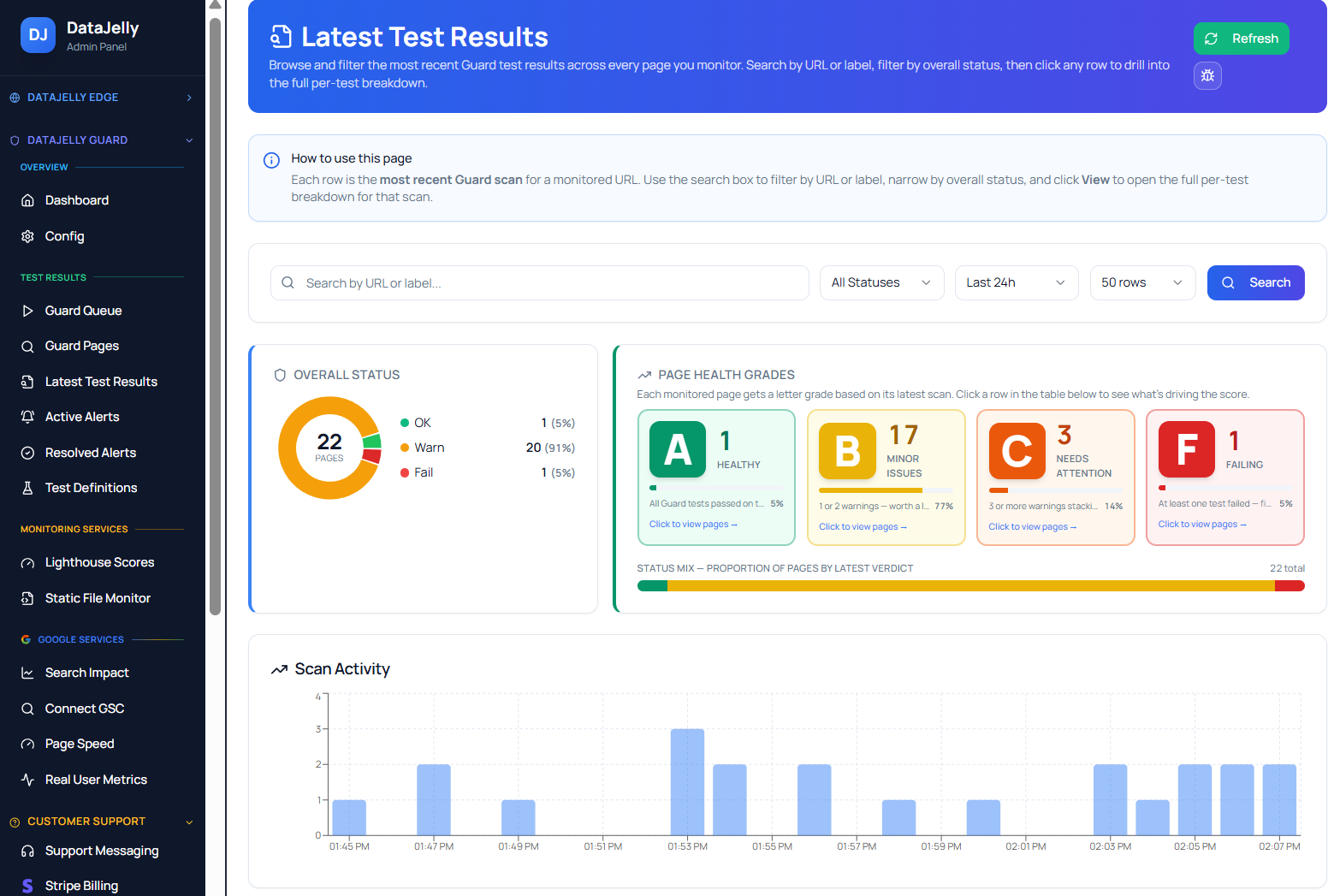
Start with severity
Review critical and high-severity failures first, especially on revenue, signup, pricing, product, docs, and high-traffic pages.
Read the resolved message
Guard output explains what failed in plain language. Use the message first, then inspect the debug detail if you need the evidence.
Compare against recent deploys
Many failures trace to a routing change, metadata change, new third-party script, SSR change, CMS publish, or build pipeline issue.
Decide whether it is real
Some pages intentionally redirect, exclude indexing, or use different templates. Guard gives evidence; the owner decides intent.
Severity at a glance
| Layer | Healthy | Worth a look | Broken |
|---|---|---|---|
| Transport | 200 with stable output | Unexpected redirect | 4xx, 5xx, TLS failure |
| Render | Meaningful rendered content | Elevated resource errors | Blank or script-shell output |
| Content | Text, title, H1 near baseline | Partial selector loss | Major DOM or text drop |
| SEO signals | Expected canonical and index state | Unexpected metadata change | Accidental noindex or canonical drift |
| Performance | Within baseline | LCP approaching 4s | Severe slow load, CWV regression |
| Dependencies | Low resource error rate | Unexpected new script | Critical bundle failure |
The DataJelly angle
DataJelly Guard is not a one-time SEO audit. It is production monitoring for the pages your business depends on. The test suite exists so teams can stop discovering crawler-visible failures weeks later in Search Console, analytics, or customer reports.
Put your most important pages under Guard
Start with the pages that drive revenue and signups, then expand. Guard runs the full test suite against real production output and alerts you when something meaningful changes.
Frequently asked questions
How many checks does Guard run?
Guard currently has a focused active suite covering roughly thirty production checks, with additional reserved test contracts for future checks.
Does Guard replace manual QA?
No. Guard catches production page health and crawler-visible regressions. Manual QA is still useful for product behavior, forms, checkout, and complex interactions.
Does Guard guarantee SEO rankings?
No. Guard does not control rankings. It helps prevent technical failures that can damage visibility, crawling, indexing, snippets, and user experience.
Should every page be in Guard?
No. Start with important pages: homepage, pricing, product pages, lead pages, docs, blog posts with traffic, landing pages, and pages that generate revenue or trust.
Keep reading
Guard Test Catalog
The full searchable reference of every test, with severity and how-to-fix guidance.
Index Monitor
Decide which discovered pages actually deserve ongoing monitoring.
Google Search Console + Guard
Map search demand to monitored page health.
Static File Monitoring
Watch sitemap.xml, robots.txt, and AI visibility files.
Lighthouse Monitoring
Track page quality scores over time without chasing noise.
How to Test What Google Sees
Manually verify crawler-visible output on key routes.
JavaScript Production Monitoring
Catch blank pages and deploy-time output regressions.