Canonical Tag Mistakes That Kill Your Traffic
A team ships a redesign. Status codes are 200. HTML is ~40 KB per page, ~900 words, no console errors. Two weeks later: indexed pages drop from 162 to 31, organic traffic is down 58%. Nothing broke. Every page was returning a canonical pointing to a staging domain. Google obeyed it and dropped production from the index.
On This Page
The Real Problem
Canonical is not a hint in practice. It's a directive most of the time. If your page says:
<link rel="canonical" href="https://wrongdomain.com/page">Google will ignore your URL, consolidate ranking signals to the canonical, and stop indexing your page. There's no warning email. No alert in Search Console for several days. By the time the "Excluded by canonical" report spikes, you've already lost weeks of traffic.
A real failing site we audited:
- • Status: 200 OK on every URL
- • HTML size: 38 KB avg
- • Visible text: ~900 words/page
- • Canonical: https://staging.site.com/[path] on every page
- • Indexed pages: 162 → 31 in 9 days. Organic traffic: -58%.
What Google Actually Sees
Google fetches your HTML, extracts the canonical, and treats it as the source of truth for indexing. Your content quality, your headings, your link graph — none of it overrides a wrong canonical. The canonical wins.
In your browser, everything looks fine: content renders, links work, no visible issues. In your monitoring stack: status 200, response time normal, no errors. Canonical is not a runtime failure — it's an indexing decision. You don't see it unless you inspect the HTML directly.
This is the same class of silent failure as accidental noindex tags and empty rendered HTML — pages "work" by every standard signal except the one that matters.
Why Tools Miss This
Uptime checks validate that the server responds and the page loads. They do not validate canonical correctness, HTML semantics, or indexability signals. You can have:
- 100% uptime
- Sub-200ms TTFB
- Zero error budget burn
- 0% index coverage
This is a page-level SEO failure, not an infrastructure failure. Standard observability has no signal for it. That's why you need monitoring that reads the actual HTML, tracks canonical values across deploys, and fires on drift. See Your Site Returns 200 OK — But Is Completely Broken for the broader pattern.
What We See in Production
Four canonical failure patterns. We see all of them, repeatedly, across React, Vite, and Lovable apps.
Canonical pointing to staging
Cause: An env var like SITE_URL didn't get swapped on the production build, or a build flag flipped to "preview".
Symptom: Production page https://site.com/pricing emits <link rel="canonical" href="https://staging.site.com/pricing">.
Impact: Production drops out of the index. Sometimes the staging domain starts ranking. Typical traffic loss: 40–70% within 7–14 days.
Canonical hardcoded to homepage
Cause: A template default like canonical = SITE_URL never gets per-route overrides wired up.
Symptom: Every page outputs <link rel="canonical" href="https://site.com/">. HTML size and content are unique per page.
Impact: Google treats every page as a duplicate of the homepage. Only the homepage stays indexed. All long-tail traffic disappears.
Missing canonical + parameter duplication
Cause: No canonical at all. Marketing tools and ad campaigns add tracking params freely.
Symptom: Google indexes /pricing, /pricing?ref=ad, /pricing?utm=campaign, and 5–20 more variants.
Impact: Link equity splits across duplicates. Rankings become unstable. Search Console fills with "Duplicate without user-selected canonical".
JavaScript-injected canonical
Cause: Canonical added by a SPA helper (e.g. React Helmet) after hydration.
Symptom: Raw HTML has no canonical. Rendered DOM has it. HTML is typically 6 KB with <100 chars of visible text — see Script Shell Pages.
Impact: Googlebot and AI crawlers never see the canonical on the first pass. Duplicates get indexed. The canonical you "added" effectively doesn't exist.
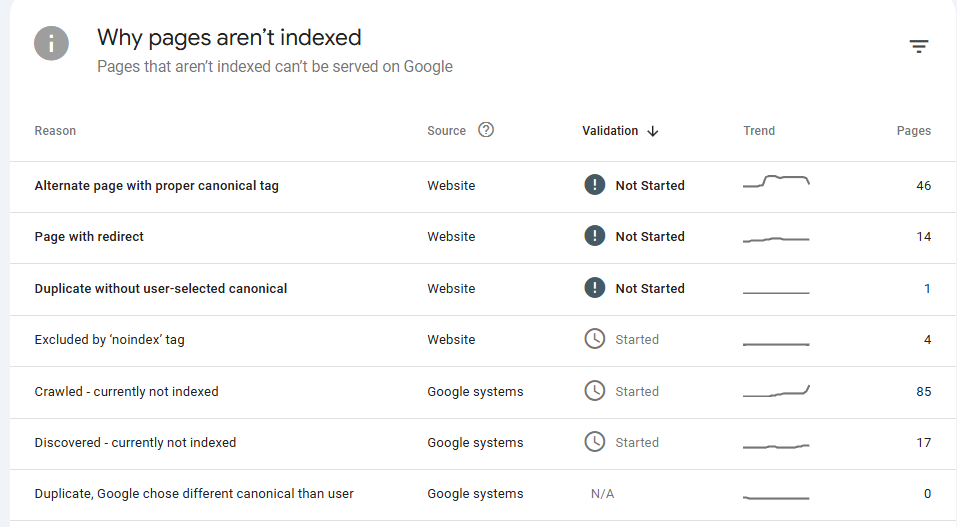
GSC Reasons → Cause → Fix
Google Search Console's Page indexing report (above) groups canonical and indexability problems under fixed reason names. Most are vague on purpose. Here's what each one actually means in production, what tends to cause it, and what to do — mapped against the screenshot above.
Alternate page with proper canonical tag
What it means: Google found this URL but it canonicalises to a different URL — so Google indexes the canonical instead. Often intentional, but at scale (46 pages in this account) it usually means something is wrong.
Common cause: Tracking parameters (?utm_*, ?ref=), pagination, faceted URLs, or trailing-slash variants all canonicalising to one page — but the canonical target is also wrong, or the variants shouldn't be crawlable in the first place.
Fix: Verify the canonical target with Page Validator. Block parameter URLs in robots.txt if they shouldn't be crawled. Confirm the target URL returns 200, not a redirect chain.
Page with redirect
What it means: Google requested the URL and got a 301/302. The redirect target gets indexed instead — but the redirect chain itself shows up here.
Common cause: Internal links still point at old URLs after a migration, or your sitemap lists the redirect source instead of the destination. Both waste crawl budget.
Fix: Use the Redirects Audit to surface chains, then update internal links and sitemap entries to the final URL. See Redirect Chains Kill Crawl Budget.
Duplicate without user-selected canonical
What it means: Google sees multiple URLs with near-identical content and no canonical tag at all. Google picks one for you — often the wrong one.
Common cause: Missing canonical in the raw HTML. Frequently a SPA where canonical is JS-injected and never reaches Googlebot's first-pass HTML.
Fix: Add a self-referential canonical to the server-rendered HTML on every page. Verify with curl — see SPA Internal Links Invisible to Google for why DOM-only injection fails.
Excluded by 'noindex' tag
What it means: The page returns a <meta name="robots" content="noindex"> or X-Robots-Tag: noindex header. Google removes it from the index.
Common cause: Staging-environment noindex left enabled in production after a deploy. The single most damaging accident in SEO. See Accidental Noindex.
Fix: Run Page Validator across key URLs after every deploy. Better: have Guard alert the moment a noindex appears on an indexable URL.
Crawled — currently not indexed
What it means: Google crawled the page but chose not to index it. No explicit error — a quality / value signal failure.
Common cause: Thin content, near-duplicate templates, or pages that render mostly via JS so Googlebot sees an empty shell. Often paired with low internal-link equity.
Fix: Audit raw HTML word count with the Site Crawler. Strengthen internal links to affected URLs and confirm content is in the SSR/edge HTML, not just the rendered DOM.
Discovered — currently not indexed
What it means: Google knows the URL exists (sitemap or external link) but hasn't crawled it yet. Often a crawl-budget or site-quality signal.
Common cause: Slow server responses, deep URLs with no internal links, or sitemaps padded with low-value URLs that compete with important pages.
Fix: Trim the sitemap to indexable URLs only, improve internal linking depth, and check TTFB with the Page Speed Analyzer.
Duplicate, Google chose different canonical than user
What it means: You declared a canonical, but Google ignored it and picked a different URL. Your declared canonical loses its index slot.
Common cause: The canonical you declared points to a weaker, redirected, or near-empty page; or content varies between the canonical and the variant enough that Google decides they're not actually duplicates.
Fix: Confirm canonical targets are the strongest, fully-rendered version. Use the HTTP Bot Comparison tool to verify Googlebot sees the same content at both URLs. Consolidate or differentiate — don't leave it ambiguous.
Pattern to watch: if 2+ of these reasons spike on the same date, it's almost always a single deploy regression — not seven separate problems. Guard correlates these signals so you fix one cause instead of chasing seven symptoms.
Run These Tests Now
Don't take our word for it. Check your own site in under a minute — especially after your most recent deploy.
Quick Test: What Do Bots Actually See?
Most people guess. Don't.
Run this test and look at the actual response your site returns to bots.
Fetch your page as Googlebot
Use your terminal:
curl -A "Googlebot" https://yourdomain.comLook for:
- Real visible text (not just
<div id="root">) - Meaningful content in the HTML
- Page size (should not be tiny)
Compare bot vs browser
Now test what a real browser gets:
curl -A "Mozilla/5.0" https://yourdomain.comIf these responses are different, Google is indexing a different page than your users see.
Stop guessing — measure it.
Real example: 253 words vs 13,547
We see this constantly. Here's a real example from production: Googlebot saw 253 words and 2 KB of HTML. A browser saw 13,547 words and 77.5 KB. Same URL — completely different content.

If your HTML doesn't contain the content, Google doesn't either.
Compare Googlebot vs browser on your site → HTTP Debug ToolCheck for common failure signals
We see this all the time in production:
- HTML under ~1KB → usually empty shell
- Visible text under ~200 characters → thin or missing content
- Missing <title> or <h1> → weak or broken page
- Large difference between bot vs browser HTML → rendering issue
Use the DataJelly Visibility Test (Recommended)
You can run this without touching curl. It shows you:
- Raw HTML returned to bots (Googlebot, Bing, GPTBot, etc.)
- Fully rendered browser version
- Side-by-side differences in word count, HTML size, links, and content
What this test tells you (no guessing)
After running this, you'll know:
- Whether your HTML is actually indexable
- Whether bots are seeing partial content
- Whether rendering is breaking in production
This is the difference between "I think SEO is set up" and "I know what Google is indexing."
If you don't understand why this happens, read: Why Google Can't See Your SPA
If this test fails
You have three real options:
SSR
Works if you can keep it stable in production
Prerendering
Breaks with dynamic content and scale
Edge Rendering
Reflects real production output without app changes
If you do nothing, you will not rank consistently. Learn how Edge Rendering works →
This issue doesn't show up in Lighthouse. It shows up in rankings.
Page Validator
Bot-readiness scan including canonical presence and target.
HTTP Bot Comparison
Diff raw bot HTML vs browser DOM — exposes JS-injected canonicals.
Visibility Test
Run a full bot-perspective check on your homepage.
Also useful: Sitemap Validator to confirm canonical URLs match what's listed, and HTTP Status Checker to verify canonical targets resolve 200 (not 301/404).
How to Detect It
1. Check raw HTML (not DevTools)
curl -s https://yoursite.com/pricing | grep -i 'rel="canonical"'Verify the canonical exists, matches the exact URL, and uses the correct production domain. If it's wrong here, it's wrong everywhere — DevTools will lie to you because it shows the rendered DOM.
2. Compare raw vs rendered
A typical broken page looks like this in raw HTML:
<!doctype html><html lang="en"><head><meta charset="UTF-8" /><title>Pricing — Acme</title><link rel="canonical" href="https://staging.acme.com/pricing"></head><body><div id="root"></div><script type="module" src="/assets/index-a3f7.js"></script></body></html>
If the canonical only appears in DevTools (rendered DOM) but not in the raw HTML response, it's unreliable. Google may never see it.
3. Validate the canonical target
curl -s -o /dev/null -w "%{http_code}\n" https://site.com/canonical-targetThe canonical URL must return 200, serve the same content, and not redirect. Pointing canonical at a 301 or 404 breaks indexing of the source page.
4. Watch Search Console signals
- Spike in Duplicate, Google chose different canonical
- Spike in Alternate page with proper canonical tag
- Drop in Indexed coverage in the Page Indexing report
These correlate directly with traffic drops. By the time GSC reports them, the regression has been live for days.
Practical Checklist
Run against the homepage and 5–10 critical URLs (pricing, top blog posts, signup) before every deploy. Fail the deploy on any hit.
Canonical presence
exactly one in raw HTML
- Present in raw HTML response
- Not injected by JavaScript
- Exactly one canonical per page
Canonical value
absolute production URL
- Matches the exact page URL (path + slash)
- Uses production domain (no staging/preview)
- Absolute URL, not relative
Canonical target
resolves 200 OK
- Target returns 200 (no 301/302/404)
- Target serves equivalent content
- No cross-domain unless intentional
Diff vs previous deploy
0 unintended changes
- Canonical value unchanged on stable URLs
- No global swap to homepage
- No environment leakage
Canonical mistakes don't break your site. They replace it.
Pages still load. Metrics still look normal. Google is indexing something else — or nothing at all. If you're not validating the HTML output directly, you will miss this until the traffic is already gone.
How DataJelly Guard Catches It
DataJelly Guard monitors real pages and detects rendering issues, content loss, and indexability regressions. It reads the actual HTML — including the canonical link — across deploys and fires on drift. Works with React, Vite, and Lovable apps with no app changes.
- Tracks canonical value per URL across every deploy
- Alerts on cross-domain canonicals (staging/preview leaks)
- Flags global homepage canonical patterns and missing canonicals
- Validates canonical targets resolve 200 OK
- Detects JS-injected canonicals (raw HTML vs rendered DOM diff)