[Crawl-Date: 2026-04-04]
[Source: DataJelly Visibility Layer]
[URL: https://datajelly.com/guides/social-preview-stabilization]
---
title: Social Preview Stabilization Guide | DataJelly
description: How to fix broken social link previews in modern JavaScript SPAs. DataJelly's Social Preview Stabilization extracts route-specific OG metadata and serves it to social bots at the edge.
url: https://datajelly.com/guides/social-preview-stabilization
canonical: https://datajelly.com/guides/social-preview-stabilization
og_title: DataJelly - The Visibility Layer for Modern Apps
og_description: Rich social previews for Slack &amp; Twitter. AI-readable content for ChatGPT &amp; Perplexity. Zero-code setup.
og_image: https://datajelly.com/datajelly-og-image.png
twitter_card: summary_large_image
twitter_image: https://datajelly.com/datajelly-og-image.png
---

# Social Preview Stabilization Guide | DataJelly
> How to fix broken social link previews in modern JavaScript SPAs. DataJelly's Social Preview Stabilization extracts route-specific OG metadata and serves it to social bots at the edge.

---

If you've ever shared a link to your site on Slack, LinkedIn, Facebook, or Twitter and seen the wrong title or description appear — you've hit a very common SPA problem.

Modern JavaScript apps (React, Vite, Next in SPA mode, no-code builders, etc.) often break link previews. Here's why — and how DataJelly fixes it.

## The Core Problem

**Social platforms do not execute JavaScript when generating link previews.**

When someone shares your URL:

1. Slack (or Facebook, LinkedIn, etc.) sends a **single HTTP request**.
2. It reads the **raw HTML response**.
3. It parses `<meta property="og:*">` and Twitter Card tags from the `<head>`.
4. It builds the preview.

That's it. No JavaScript engine. No DOM rendering. No client-side hydration.

If your site relies on client-side rendering to inject metadata (via React Helmet or similar), **the social bot never sees it**.
## Why This Breaks in SPAs

In most SPAs:

- The server returns a **generic `index.html` shell**.
- Open Graph tags are **identical across all routes**.
- React Helmet updates metadata **in the live DOM** — after JavaScript executes.
- Bots **never execute that runtime code**.

The result?

- Every shared link shows your **homepage title**.
- `/pricing`, `/blog/post`, `/docs/api` — all preview the same.
- You lose **clarity, context, and engagement**.
## What DataJelly Does Differently

When **Social Preview Stabilization** is enabled for a domain, DataJelly fixes this at the edge.

Step 1
### Fully Rendered Snapshot

DataJelly captures a fully rendered HTML snapshot of each route — **after JavaScript execution**. That means:

- React Helmet metadata is **present**.
- Route-specific `<title>` is **correct**.
- Dynamic OG tags are **applied**.
- The DOM reflects **what users actually see**.

Step 2
### Intelligent Metadata Extraction

From that rendered snapshot, DataJelly extracts:

- `og:title`
- `og:description`
- `og:image`
- `og:url`
- `og:type`
- Twitter equivalents (`twitter:card`, `twitter:title`, etc.)

If multiple versions of a tag exist (e.g., static shell + React Helmet), DataJelly:

- Prefers tags marked with `data-react-helmet="true"`
- Falls back to standard `og:*`, `twitter:*`, or `<meta name="description">` if needed

This ensures the **runtime metadata wins** over the static shell.

Step 3
### Purpose-Built Social Preview HTML

Instead of returning your full app HTML, DataJelly generates a **minimal document** that contains only what social platforms need:

- `<title>`
- `og:*` tags
- Twitter Card tags

No scripts. No layout. No SPA shell.
Just clean metadata.

Step 4
### Edge-Level Bot Routing

At request time, DataJelly classifies the incoming user agent:

- **Human**
- **Search engine bot**
- **AI bot**
- **Social preview bot**

If the request is from `facebookexternalhit`, `Slackbot`, `Twitterbot`, `LinkedInBot`, etc. — and Social Preview Stabilization is enabled:

👉 DataJelly serves the minimal social preview HTML.

Everything else remains unchanged. Humans get your app. Search bots get rendered HTML. AI bots get Markdown.
## Multi-Representation Architecture

With DataJelly enabled, each route can serve different representations depending on who is asking:
| Audience | Response Returned |
| --- | --- |
| 🧑 Human | Origin application |
| 🔍 Search engine | Pre-rendered SEO snapshot |
| 🤖 AI bot | Structured Markdown (optional) |
| 📱 Social bot | Minimal Social Preview HTML |
Each system gets exactly what it needs — nothing more, nothing less.
## Why This Matters

Broken previews hurt:

- **Click-through rates**
- **Trust**
- **Clarity**
- **Brand perception**

And the worst part? **Most developers don't realize it's happening** — because everything looks fine in the browser.
Social Preview Stabilization fixes link previews **without requiring frontend changes**.

- No refactor.
- No SSR migration.
- No code rewrite.

Just flip a toggle per domain.
## Manage & Monitor with DataJelly

DataJelly doesn't just fix social previews — it gives you **full visibility and control** over the Open Graph data being served for every page on your site.
### Social Preview Audit

Most AI-built SPAs share a dirty secret: **every page has identical OG data**. Your homepage, pricing page, about page, and blog posts all show the same generic title and description when shared on social platforms.

DataJelly's **Social Preview Audit** automatically detects this. It groups pages with duplicate OG data, flags pages with missing metadata entirely, and highlights the pages that already have unique, correct previews.
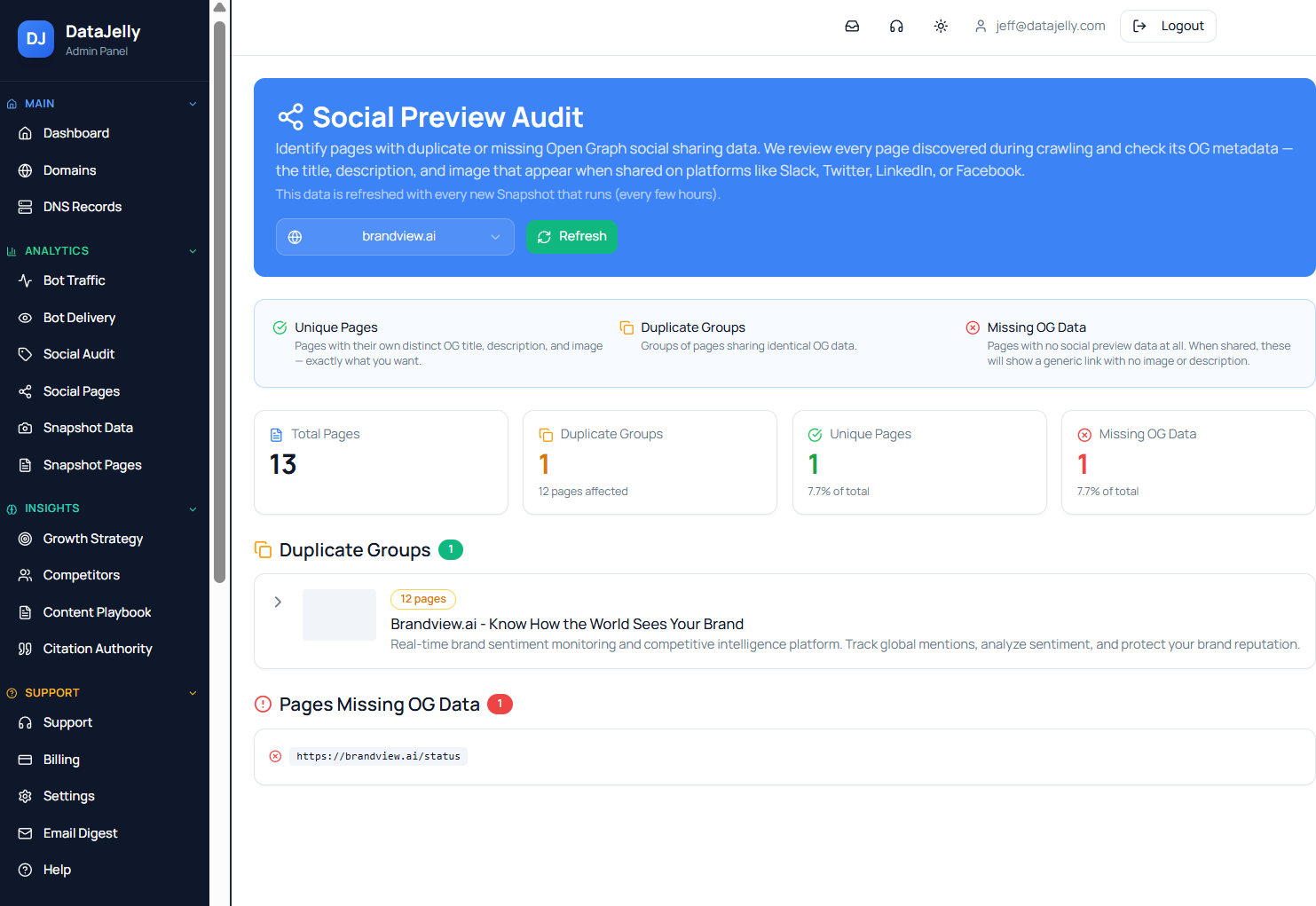
![DataJelly Social Preview Audit dashboard showing duplicate OG groups, unique pages, and missing OG data detection](https://datajelly.com/assets/social-audit-dashboard-H3YcKY0W.png) Social Preview Audit: instantly see which pages share duplicate OG data — a common problem in SPAs.
### Per-Page OG Management

DataJelly automatically extracts unique Open Graph data per page from your rendered snapshots. But for key pages — your homepage, pricing, about, etc. — you may want full manual control.

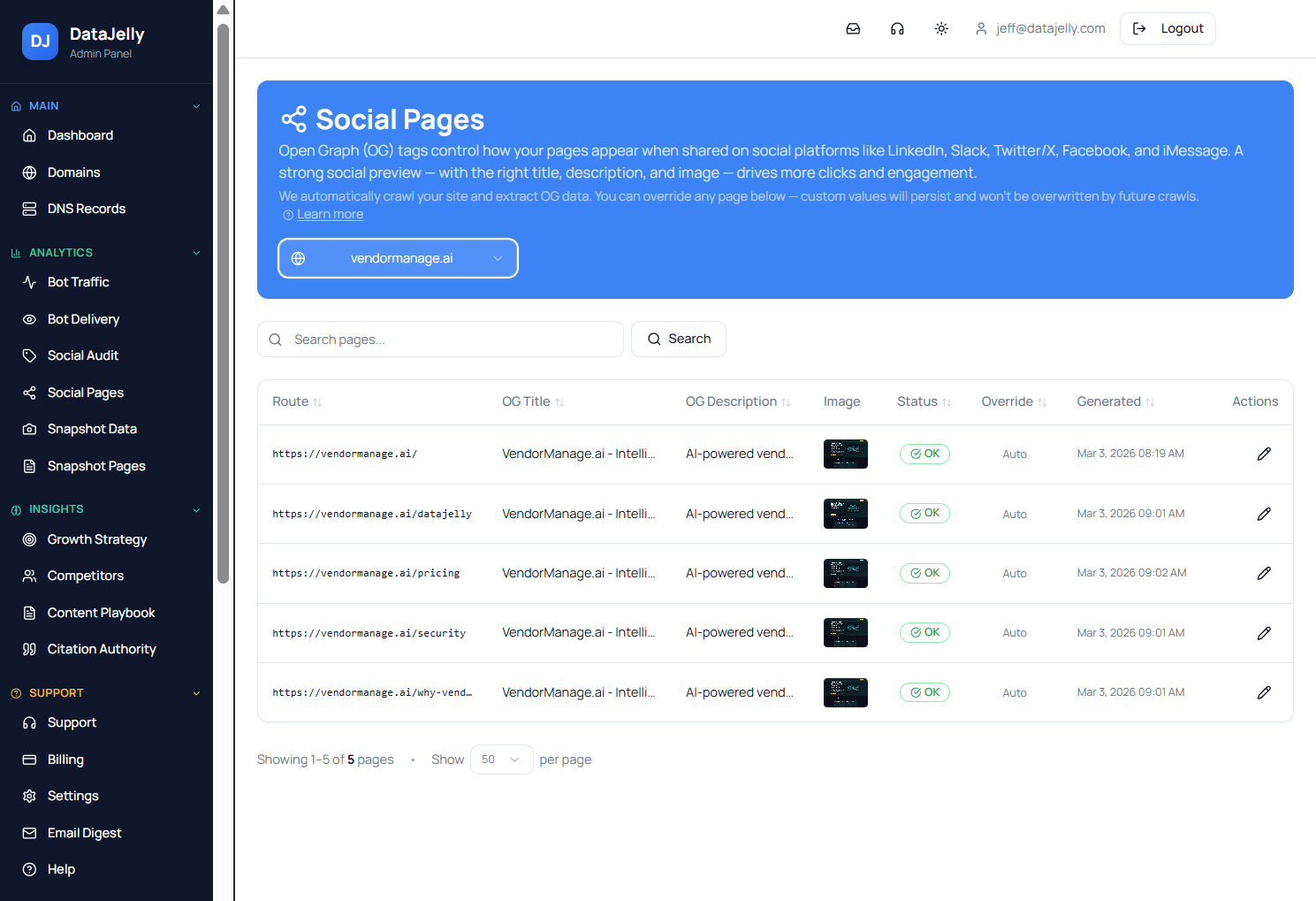
The **Social Pages** dashboard lets you see every route's OG title, description, and image at a glance. You can override any page's metadata directly, and those custom values **persist across future crawls** — they won't be overwritten.
![DataJelly Social Pages dashboard showing per-route OG title, description, image, and override status](https://datajelly.com/assets/social-pages-dashboard-CYayPkey.png) Social Pages: view and manage OG metadata for every route across all your domains.
### Manual Override

Need your pricing page to say something specific when shared? Click edit on any page and set the exact OG title, description, image URL, and canonical URL. Your custom values are served to social bots going forward — no code changes needed.
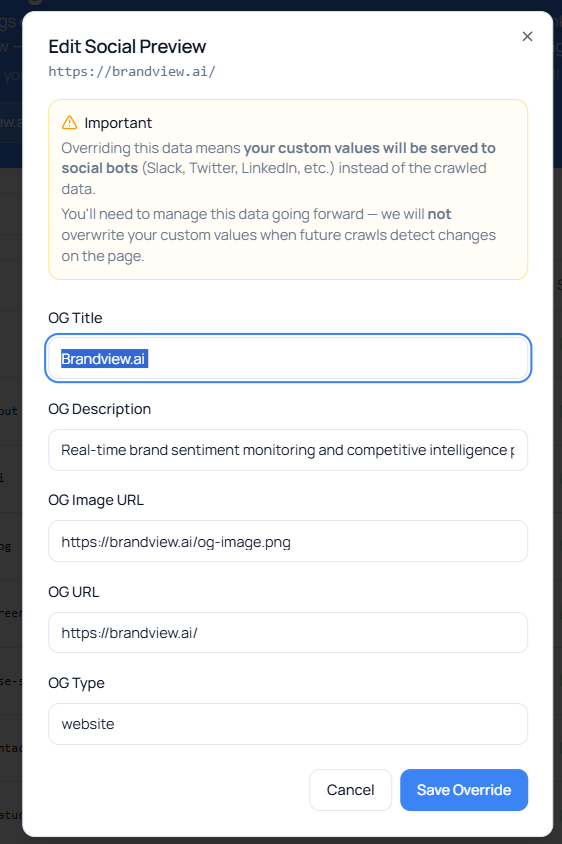
![DataJelly manual OG override dialog allowing custom title, description, image URL, and canonical URL per page](https://datajelly.com/assets/social-preview-override-DQnlkqZA.png) Override any page's social preview data directly — no code or deploy required.
## The Result

Instead of this:
❌ Every shared link shows your homepage.
You get this:

✅ `/pricing` → Pricing preview

✅ `/blog/how-we-built-this` → Blog preview

✅ `/docs/api` → API docs preview

Correct. Route-specific. Deterministic.

## Related Guides

### [Lovable SEO 101](https://datajelly.com/guides/lovable-seo)
Complete SEO guide for Lovable.dev sites. ### [SPA SEO Guide](https://datajelly.com/guides/spa-seo)
Fix routing, metadata, and indexing in SPAs. ### [Bot Detection & Edge Routing](https://datajelly.com/bot-detection)
How DataJelly identifies bots at the edge. ### [Visibility Layer Guide](https://datajelly.com/guides/visibility-layer)
Fix AI and search visibility for JavaScript apps. ### [Fixing Broken Social Previews](https://datajelly.com/blog/fixing-broken-social-previews-in-spas)
The original announcement blog post.

## Structured Data (JSON-LD)
```json
{"@context":"https://schema.org","@type":"Article","headline":"Social Preview Stabilization Guide","description":"How to fix broken social link previews in modern JavaScript SPAs. DataJelly\u0027s Social Preview Stabilization extracts route-specific OG metadata and serves it to social bots at the edge.","datePublished":"2026-03-02","dateModified":"2026-03-15","url":"https://datajelly.com/guides/social-preview-stabilization","author":{"@type":"Person","name":"Jeff","jobTitle":"Founder"},"publisher":{"@type":"Organization","name":"DataJelly","url":"https://datajelly.com"}}
```

```json
{"@context":"https://schema.org","@type":"FAQPage","mainEntity":[{"@type":"Question","name":"Why do my social media link previews show the wrong title and description?","acceptedAnswer":{"@type":"Answer","text":"Social platforms like Slack, Facebook, LinkedIn, and Twitter don\u0027t execute JavaScript when fetching link previews. They send a single HTTP request, read the raw HTML, and parse Open Graph and Twitter Card meta tags from the \u003Chead\u003E. If your site is a single-page application (SPA) that uses client-side rendering with React Helmet or similar, those tags only exist after JavaScript executes \u2014 which the social bot never does. The result: every shared link shows your generic homepage title."}},{"@type":"Question","name":"How does DataJelly fix broken social previews for SPAs?","acceptedAnswer":{"@type":"Answer","text":"DataJelly\u0027s Social Preview Stabilization captures a fully rendered HTML snapshot of each route after JavaScript execution, extracts the route-specific OG and Twitter Card metadata, generates a minimal HTML document containing only the social preview tags, and serves that minimal document to social bots (facebookexternalhit, Slackbot, Twitterbot, LinkedInBot) at the edge. No frontend changes or SSR migration required."}},{"@type":"Question","name":"What is DataJelly\u0027s multi-representation architecture?","acceptedAnswer":{"@type":"Answer","text":"DataJelly serves different optimized responses depending on who is requesting a page: humans get the original application, search engines get pre-rendered SEO snapshots, AI bots get structured Markdown, and social bots get minimal Social Preview HTML with correct OG tags. Each system gets exactly what it needs."}},{"@type":"Question","name":"Do I need to change my code to fix social previews with DataJelly?","acceptedAnswer":{"@type":"Answer","text":"No. Social Preview Stabilization works at the edge with zero frontend changes. There\u0027s no SSR migration, no code refactor, and no build step changes required. You enable it per domain with a toggle, and DataJelly handles the rest."}},{"@type":"Question","name":"Does Social Preview Stabilization affect search engine indexing?","acceptedAnswer":{"@type":"Answer","text":"No. Search engines (Google, Bing, etc.) continue to receive the full pre-rendered SEO snapshot. Social Preview Stabilization only changes the response for social preview bots."}},{"@type":"Question","name":"Does Social Preview Stabilization affect AI bots like GPTBot or Claude?","acceptedAnswer":{"@type":"Answer","text":"No \u2014 unless you explicitly enable AI Markdown. DataJelly classifies traffic into Human, Search engine bot, AI bot, and Social preview bot. Social Preview Stabilization only applies to social bots. AI bots continue to receive structured Markdown (if enabled) or the standard SEO snapshot HTML. AI visibility and social previews are fully separated."}},{"@type":"Question","name":"What if I don\u0027t enable Social Preview Stabilization?","acceptedAnswer":{"@type":"Answer","text":"Nothing changes. Social bots will continue to receive your origin HTML, just like today. If your SPA returns a generic index.html shell, previews will remain generic. The feature is opt-in per domain."}},{"@type":"Question","name":"How does DataJelly choose the correct metadata for social previews?","acceptedAnswer":{"@type":"Answer","text":"DataJelly captures a fully rendered snapshot of your route after JavaScript execution. It then prefers metadata injected by React Helmet (or similar libraries), falls back to standard og:*, twitter:*, or meta name description tags if needed, and generates a clean, minimal HTML document for social platforms. The runtime metadata always wins over the static shell."}},{"@type":"Question","name":"Does Social Preview Stabilization change what users see?","acceptedAnswer":{"@type":"Answer","text":"No. Human visitors still receive your application exactly as before. Only social preview bots receive the minimal preview HTML."}},{"@type":"Question","name":"Why not just use SSR instead of Social Preview Stabilization?","acceptedAnswer":{"@type":"Answer","text":"SSR can solve this, but it requires frontend refactoring, infrastructure changes, and deployment adjustments. Social Preview Stabilization achieves the same result at the edge \u2014 without touching your application code."}}]}
```


## Discovery & Navigation
> Semantic links for AI agent traversal.

* [DataJelly Edge](https://datajelly.com/products/edge)
* [DataJelly Guard](https://datajelly.com/products/guard)
* [Features](https://datajelly.com/#features)
* [Pricing](https://datajelly.com/pricing)
* [Visibility Test](https://datajelly.com/visibility-test)
* [Prerendering](https://datajelly.com/prerendering)
* [Prerender Alternative](https://datajelly.com/prerender-alternative)
* [Lovable SEO](https://datajelly.com/lovable-seo)
* [Visibility Layer Guide](https://datajelly.com/guides/visibility-layer)
* [How Snapshots Work](https://datajelly.com/guides/how-snapshots-work)
* [AI SEO Platform](https://datajelly.com/ai-seo-platform)
* [Bot Detection](https://datajelly.com/bot-detection)
* [Dashboard](https://dashboard.datajelly.com/)
* [SEO Tools](https://datajelly.com/seo-tools)
* [Visibility Test](https://datajelly.com/seo-tools/visibility-test)
* [Site Audit](https://datajelly.com/seo-tools/site-audit)
* [Bot Test](https://datajelly.com/seo-tools/bot-test)
* [Social Card Preview](https://datajelly.com/seo-tools/social-card-preview)
* [Robots.txt Tester](https://datajelly.com/seo-tools/robots-txt-tester)
* [Sitemap Validator](https://datajelly.com/seo-tools/sitemap-validator)
* [Structured Data Validator](https://datajelly.com/seo-tools/structured-data-validator)
* [HTTP Header Checker](https://datajelly.com/seo-tools/http-header-checker)
* [Page Speed Analyzer](https://datajelly.com/seo-tools/page-speed-analyzer)
* [SSL Certificate Checker](https://datajelly.com/seo-tools/ssl-checker)
* [DNS Records Viewer](https://datajelly.com/seo-tools/dns-records-viewer)
* [Guides](https://datajelly.com/guides)
* [Getting Started](https://datajelly.com/guides/getting-started)
* [SPA SEO Guide](https://datajelly.com/guides/spa-seo)
* [JavaScript SEO Guide](https://datajelly.com/guides/javascript-seo)
* [SSR Guide](https://datajelly.com/guides/ssr)
* [Search Engine Crawling Guide](https://datajelly.com/guides/search-engine-crawling)
* [Lovable SEO Guide](https://datajelly.com/guides/lovable-seo)
* [AI SEO Testing Guide](https://datajelly.com/guides/ai-seo)
* [SEO Testing Guide](https://datajelly.com/guides/seo-testing)
* [SERP Tracking Guide](https://datajelly.com/guides/serp-tracking)
* [Security Testing Guide](https://datajelly.com/security)
* [About Us](https://datajelly.com/about)
* [Contact](https://datajelly.com/contact)
* [Blog](https://datajelly.com/blog)
* [Terms of Service](https://datajelly.com/terms)