Fixing Broken Social Previews in Modern SPAs
On This Page
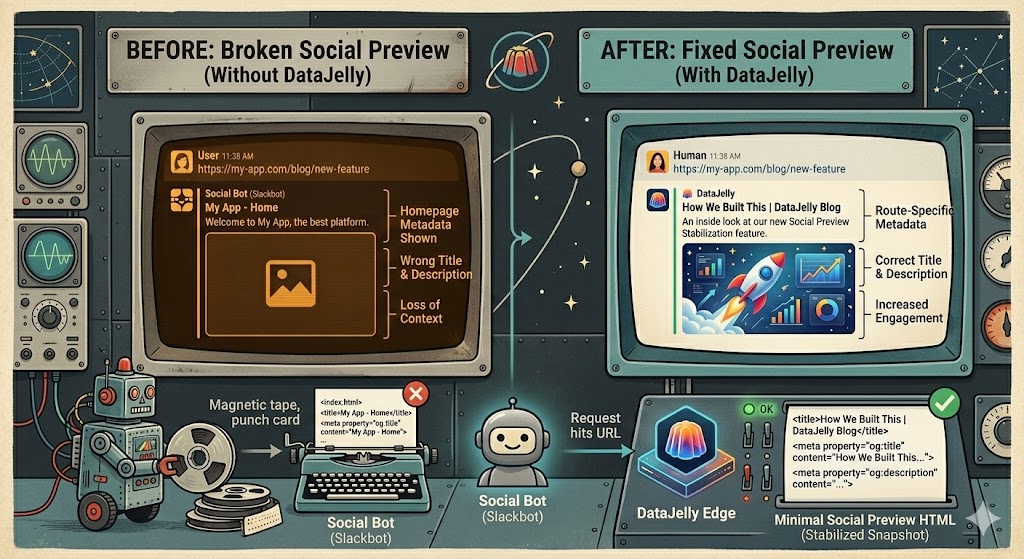
Social platforms like Slack, LinkedIn, Facebook, and Twitter don't execute JavaScript when generating link previews. If your site relies on client-side rendering (React, Vite, no-code builders), every shared link can show the wrong title, description, or image.
Social Preview Stabilization fixes this at the edge — no code changes, no SSR migration. DataJelly captures your fully rendered snapshot, extracts route-specific OG metadata, and serves a minimal preview HTML to social bots automatically.
Quick Test: What Do Bots Actually See?
Most people guess. Don't.
Run this test and look at the actual response your site returns to bots.
Fetch your page as Googlebot
Use your terminal:
curl -A "Googlebot" https://yourdomain.comLook for:
- Real visible text (not just
<div id="root">) - Meaningful content in the HTML
- Page size (should not be tiny)
Compare bot vs browser
Now test what a real browser gets:
curl -A "Mozilla/5.0" https://yourdomain.comIf these responses are different, Google is indexing a different page than your users see.
Stop guessing — measure it.
Real example: 253 words vs 13,547
We see this constantly. Here's a real example from production: Googlebot saw 253 words and 2 KB of HTML. A browser saw 13,547 words and 77.5 KB. Same URL — completely different content.

If your HTML doesn't contain the content, Google doesn't either.
Compare Googlebot vs browser on your site → HTTP Debug ToolCheck for common failure signals
We see this all the time in production:
- HTML under ~1KB → usually empty shell
- Visible text under ~200 characters → thin or missing content
- Missing <title> or <h1> → weak or broken page
- Large difference between bot vs browser HTML → rendering issue
Use the DataJelly Visibility Test (Recommended)
You can run this without touching curl. It shows you:
- Raw HTML returned to bots (Googlebot, Bing, GPTBot, etc.)
- Fully rendered browser version
- Side-by-side differences in word count, HTML size, links, and content
What this test tells you (no guessing)
After running this, you'll know:
- Whether your HTML is actually indexable
- Whether bots are seeing partial content
- Whether rendering is breaking in production
This is the difference between "I think SEO is set up" and "I know what Google is indexing."
If you don't understand why this happens, read: Why Google Can't See Your SPA
If this test fails
You have three real options:
SSR
Works if you can keep it stable in production
Prerendering
Breaks with dynamic content and scale
Edge Rendering
Reflects real production output without app changes
If you do nothing, you will not rank consistently. Learn how Edge Rendering works →
This issue doesn't show up in Lighthouse. It shows up in rankings.
Read the Full Guide
The complete technical walkthrough covers the four-step edge pipeline, FAQ on how it interacts with AI bots and search engines, the multi-representation architecture, and dashboard management features.
Social Preview Stabilization GuideRelated Reading
Visibility Layer Guide
How the DataJelly visibility layer works.
Bots: The Complete Guide
Directory of 90+ crawlers we see on the platform.
Social Card Preview Tool
Check your OG metadata and preview cards.
Prerendering
How prerendering delivers complete HTML to bots.
Bot Detection
How DataJelly identifies and routes bot traffic.
DataJelly Edge
Edge rendering for search and AI bot visibility.